Finding a generic name for all of the AI Models
They are all essentially different. What can we call them? Big and small, local and propriatory.
There are
- reasoning engines → when they interpret, explain, decide
- language engines → when they read/write human text
- signal processors → when they score, classify, embed
- assistive runtimes → when they sit behind your API and respond
Structured Intelligence Architecture
That fits the whole beast:
Backdrop = input + display
Python = structure + deterministic logic
Local signal layer = matching/scoring/classification
Interpreter layer = rare escalation
-
Structured Intelligence Pipeline
Use this when describing the flow.
A more ops-flavoured version:
-
Deterministic-First Intelligence Stack
That one says the important thing:
We compute what we can prove, and escalate only what we cannot resolve.
-
Deterministic-First Structured Intelligence
local models
external models
reasoning engines
language engines
signal processors
assistive runtimes
And the collective name for all those “models/tools/runtimes”?
-
Interpretive Engines
Nice umbrella. Big, small, local, proprietary, text, reasoning, embedding. They all interpret signals into useful output.
So your clean framing becomes:
This is a Deterministic-First Structured Intelligence system.
Backdrop handles input and display. Python owns structure, scoring, and truth. Local signal processors handle semantic matching. Interpretive engines are used only for low-confidence edge cases.
Deterministic first.
Local where possible.
Interpretive only by escalation.
Backdrop = input + display
Python = structure + logic
Semantic matching (local wins here)
This is where you don’t need external anything.
Use:
- sentence-transformers
- or lightweight embedding models
For:
- “choy + chicken but no tomato”
- fuzzy matching
- clustering similar records
This is your signal layer.
Fast. Local. Deterministic-ish.
“We use local signal processing for structure and scoring, and bring in external interpreters only when meaning cannot be derived deterministically.”
Structured reasoning (where we don't outsource ever)
The logic like:
- scoring pairs
- Wilson confidence
- rule thresholds
👉 stays in Python
But!? For deeper dives...
Edge-case interpretation (surgical use)
This is the fun one.
When something breaks your rules:
- weird receipt line
- ambiguous ingredient
- malformed text
We can do:
if low_confidence:
    call_interpreter()
if low_confidence:
call_interpreter()
That’s not dependency. That’s escalation.
Structured reasoning to edge-case interpretation
Structured Reasoning:
- define truth
- compute totals
- assign final labels
Interpreter:
- explain results
- rephrase output
- generate readable insights
[Backdrop Form]
        ↓
[Python: shape data]
        ↓
[Python: compute signals]
        ↓
[Optional: external interpreter]
        ↓
[Python: validate + finalize]
        ↓
[Backdrop display]
We’re not “integrating AI into a CMS.”
We’re doing:
Backdrop = structured input + controlled display
Python = deterministic reasoning engine
Interpreter = escalation layer (rare, deliberate)
This is a three-tier cognition system, not a plugin.
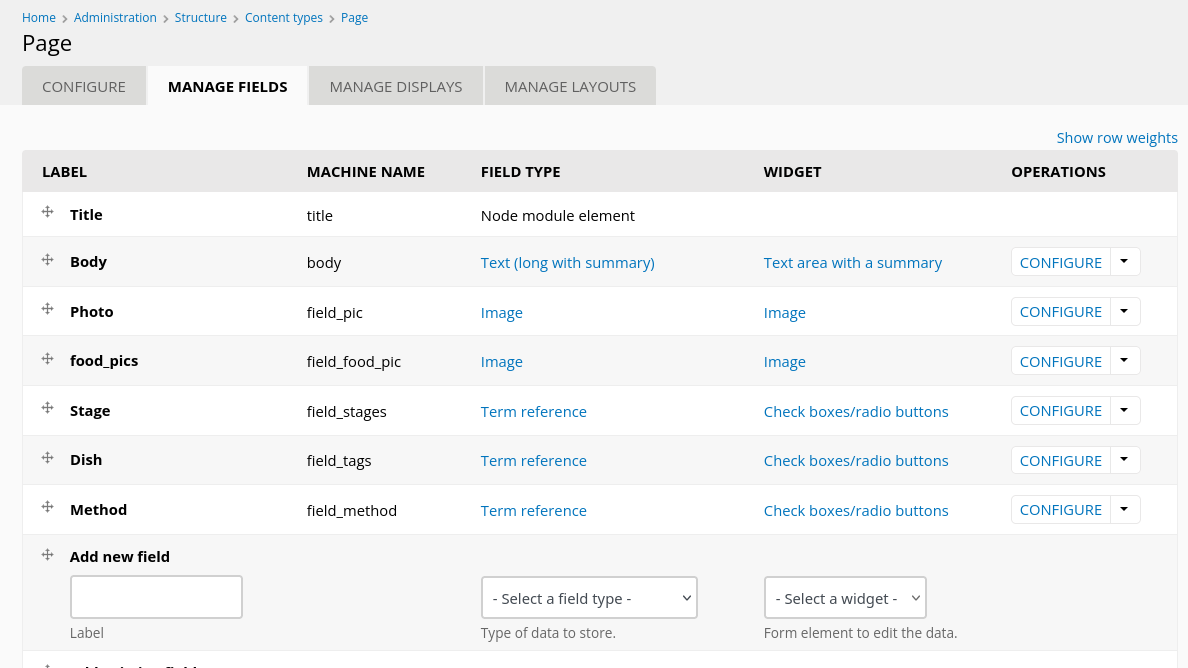
Yes. Clean, minimal, no ceremony. Let’s wire a local Python “brain” behind your Backdrop content type.
You already have the “form” (Page content type). Now we add a door.
🧭 Shape of the flow (your mental model)
Backdrop (node form)
   ↓
POST /api/recipe/enrich
   ↓
Python (local service)
   ↓
JSON response (signals, tags, metadata)
   ↓
Backdrop (stores or displays)
No magic. Just a handshake 🤝
🐍 1. Minimal Python service (Flask)
Run this locally on the same box (Camelot-style, nice and contained):
# app.py
from flask import Flask, request, jsonify

app = Flask(__name__)

@app.route("/api/recipe/enrich", methods=["POST"])
def enrich():
    data = request.json

    # extract only what you care about
    title = data.get("title")
    body = data.get("body")
    tags = data.get("dish", [])

    # pretend "intelligence"
    response = {
        "summary": f"{title} analyzed",
        "signals": {
            "has_protein": "chicken" in body.lower(),
            "complexity": "low" if len(body) < 500 else "medium"
        },
        "enriched_tags": tags + ["processed"]
    }

    return jsonify(response)

if __name__ == "__main__":
    app.run(host="127.0.0.1", port=5000)
Run:
python3 app.py
Now you have:
http://127.0.0.1:5000/api/recipe/enrich
🌐 2. Backdrop side (quick prototype)
You don’t need a full module yet. Start with a hook or simple POST trigger.
Option A (fastest): use a custom module with hook_node_insert
function mymodule_node_insert($node) {
  if ($node->type == 'page') {

    $payload = [
      'title' => $node->title,
      'body' => $node->body[LANGUAGE_NONE][0]['value'],
      'dish' => array_column($node->field_tags[LANGUAGE_NONE] ?? [], 'tid'),
    ];

    $options = [
      'method' => 'POST',
      'data' => json_encode($payload),
      'headers' => [
        'Content-Type' => 'application/json',
      ],
      'timeout' => 2,
    ];

    $response = drupal_http_request('http://127.0.0.1:5000/api/recipe/enrich', $options);

    if ($response->code == 200) {
      $result = json_decode($response->data, TRUE);

      // Example: store result back into a field
      $node->field_method[LANGUAGE_NONE][0]['value'] = $result['summary'];

      node_save($node);
    }
  }
}
🧪 3. Test it manually first (important)
Before wiring Backdrop, hit it directly:
curl -X POST http://127.0.0.1:5000/api/recipe/enrich \
  -H "Content-Type: application/json" \
  -d '{
    "title": "Test Dish",
    "body": "Chicken with herbs",
    "dish": ["dinner"]
  }'
If that works → your door is alive.
🧱 4. What you’ve just built (important)
You now have:
- Backdrop = data + UI
- Python = interpretation layer
- HTTP = contract
This is the core pattern you were aiming for:
“We enrich a Backdrop content type by round-tripping it through a local Python service.”
🔧 Next logical upgrades (not required yet)
Keep it lean, but here’s where it goes:
-
Add
/api/recipe/query(search/filter endpoint) - Normalize payloads (consistent JSON schema)
-
Move from
node_insert→ button-trigger or async queue -
Add nginx reverse proxy:
/api/ → 127.0.0.1:5000
⚡ The important insight
You didn’t bolt AI into Backdrop.
You built a clean seam:
- Backdrop doesn’t “think”
- Python doesn’t “store”
- They handshake like two professionals who don’t overshare
If you want next step:
We can define a clean JSON contract (your recipe prototype: includes, excludes, provides, region) and make both sides obey it like a treaty.
$response = backdrop_http_request('http://127.0.0.1:5000/api/query', array(
  'method' => 'POST',
  'data' => json_encode(array('text' => $input)),
  'headers' => array('Content-Type' => 'application/json'),
));

$result = json_decode($response->data, TRUE);
Perfect. Now you’re thinking in intent, not strings. That’s the real switch flipping ⚡
“Chicken soup” was just a heartbeat check.
What you actually want is:
“I have this thing… what can I do with it?”
That’s a completely different contract.
🧭 Let’s reshape the call (closer to your world)
Instead of:
'text' => $input
You send something like:
$payload = array(
  'intent' => 'use_ingredient',
  'ingredient' => 'chicken broth',
  'quantity' => '1 litre',
  'constraints' => array(
    'already_thawed' => TRUE,
    'avoid_refreeze' => TRUE
  )
);

$response = backdrop_http_request('http://127.0.0.1:5000/api/query', array(
  'method' => 'POST',
  'data' => json_encode($payload),
  'headers' => array('Content-Type' => 'application/json'),
));

$result = json_decode($response->data, TRUE);
dpm($result);
🐍 Python now speaks your language
@app.route("/api/query", methods=["POST"])
def query():
    data = request.json

    if data.get("intent") == "use_ingredient":
        ingredient = data.get("ingredient")
        qty = data.get("quantity")

        # stub logic for now
        return jsonify({
            "suggestions": [
                f"Soup using {ingredient}",
                f"Sauce reduction ({qty})",
                f"Grain cooking base with {ingredient}"
            ],
            "note": "Use it today (already thawed)"
        })

    return jsonify({"status": "unknown intent"})
🧠 What just happened (this is the important bit)
You moved from:
🔤 “search string”
to:
🧩 “structured situation”
That unlocks everything later:
- filtering recipes
- excluding ingredients (“no tomatoes”)
- time constraints (“< 45 min”)
- inventory-aware cooking
🧱 Where your Backdrop fields come in
From your screenshot, you already have:
-
Dish(tags) -
Method -
Stage -
Body - (and your now-removed food pics 😄)
Those become your dataset, not your query.
The Python side becomes:
“Given ingredient X, find nodes where X appears in Body or tags”
⚡ Ultra-practical next step
Don’t overbuild. Just fake it once:
Hardcode 2–3 “recipes” in Python:
recipes = [
    {"title": "Chicken Rice", "ingredients": ["chicken broth", "rice"]},
    {"title": "Veg Soup", "ingredients": ["vegetables", "chicken broth"]},
]
Then filter:
matches = [r for r in recipes if "chicken broth" in r["ingredients"]]
Return that.
🧭 Mental model (keep this)
Backdrop = pantry + cookbook 📚
Python = the cook thinking out loud 🍳
You’re not searching text.
You’re asking:
“What can I do with what I’ve got?”
If you want next, we can wire this to:
- actual Backdrop node exports
- or a tiny JSON file generated from your site
and make recipes.fred.ca feel like it’s thinking instead of listing.

This is the seam where architecture turns into plumbing. The design is clean. Now you need a door that Backdrop can knock on without dragging Python into its basement.
Short answer: yes — take the API step now. Not because it’s trendy, but because it locks your boundary early and prevents the CMS from “helpfully” absorbing your logic later.
“I already have a local Python service that can normalize ingredients and reason over a small recipe dataset.
I’m wondering if Backdrop could act as the content layer and just call that service.”
The Wiring Pattern (no surprises, no magic)
Think of this as a controlled corridor, not a free-for-all:
Backdrop (Webform or page)
        ↓ POST /api/query
Python API (Flask/FastAPI)
        ↓
[shape → score → thresholds]
        ↓
if low_confidence → interpreter()
        ↓
[validate + finalize]
        ↓ JSON
Backdrop renders result
Backdrop never “thinks.”
Python never “renders.”
That separation is your leverage.
⚙️ Step 1 — Stand up the Python door (minimal, surgical)
Use something like FastAPI or Flask. Keep it boring.
Example:
from fastapi import FastAPI
from pydantic import BaseModel

app = FastAPI()

class Query(BaseModel):
    text: str

@app.post("/api/query")
def process(query: Query):
    shaped = shape_data(query.text)
    signals = compute_signals(shaped)

    if signals["confidence"] < 0.6:
        signals = call_interpreter(signals)

    result = finalize(signals)

    return result
Run it locally:
uvicorn app:app --host 127.0.0.1 --port 5000That’s your castle gate.
🧩 Step 2 — Backdrop as the caller (not the brain)
You’ve got two clean options:
Option A — Webform (fastest path)
- Build a form
- Submit to a custom handler
- That handler does an HTTP POST to your Python API
Option B — Backdrop CMS Services module (cleaner long-term)
-
Expose a Backdrop endpoint like
/api/proxy - That endpoint forwards requests to Python
- Gives you control, logging, auth later
🔌 Step 3 — The actual call (this is the only “integration”)
In Backdrop (PHP side), you’re basically doing:
$response = backdrop_http_request('http://127.0.0.1:5000/api/query', array(
  'method' => 'POST',
  'data' => json_encode(array('text' => $input)),
  'headers' => array('Content-Type' => 'application/json'),
));

$result = json_decode($response->data, TRUE);
That’s it.
No SDKs. No ceremony. Just a POST.
🧠 Step 4 — Respect your escalation model
This is where your design shines. Keep it strict:
- Backdrop → never decides anything
- Python core → deterministic truth
- Interpreter → only when summoned
Your pattern:
if low_confidence:
    call_interpreter()
That’s not “AI-powered.”
That’s exception handling with a brain.
🧪 Step 5 — Validate the loop early
Before adding complexity, prove this loop:
- Type text in Backdrop form
- See JSON come back
- Render 2–3 fields on screen
If that works, the system is alive.
Everything else is refinement.
🚧 When not to overbuild (right now)
Skip for now:
- auth layers
- queueing systems
- async pipelines
- CMS-side AI modules (like OpenAI plugins)
They blur your boundary.
You want a tight loop first.
🧭 Strategic read (this matters more than code)
You’re not “integrating AI into a CMS.”
You’re doing this:
Backdrop = structured input + controlled display
Python = deterministic reasoning engine
Interpreter = escalation layer (rare, deliberate)
That’s a three-tier cognition system, not a plugin.
🔥 Decision checkpoint
You’re at a fork:
- Keep prototyping inside Python → faster experimentation
- Or wire Backdrop now → validates the real architecture
Given how strongly you care about control and separation,
👉 wire it now, but keep it thin.
Now that framing clicks. You’re not pitching a feature. You’re defining governance + architecture in one stroke.
Let’s write it the way a Drupal/Backdrop audience will actually absorb it.
📜 Backdrop’s New AI Usage Policy (Draft)
1. Core Principle
AI is not a data source. It is an escalation tool.
Backdrop remains the system of record.
All structured reasoning and decision logic must remain deterministic and auditable.
2. Architectural Model
This system introduces a Structured Intelligence Architecture deployed alongside Backdrop.
Backdrop CMS (PHP)
  - Forms (input)
  - Content (database)
  - Display (theme/views)
        ↓ HTTP (local)

Python Intelligence Service (same host or internal network)
  - Data shaping (structure normalization)
  - Signal processing (scoring, matching, embeddings)
  - Deterministic reasoning (rules, thresholds, confidence)
  - Optional interpreter escalation (external or local)
        ↓ JSON

Backdrop CMS
  - Final rendering
Key constraint:
- Python is a local service, not a SaaS dependency
- Database remains under Backdrop control
- Network calls are internal unless explicitly escalated
3. Responsibility Boundaries
Backdrop (System of Record)
- Owns all content and schemas
- Handles all user interaction
- Controls final rendering and display
- Never delegates decision authority
Python Service (Deterministic Intelligence Layer)
- Shapes incoming data into structured form
-
Computes signals:
- pair scoring
- clustering / similarity
- rule thresholds
- confidence scoring (e.g., Wilson)
- Produces repeatable, testable outputs
👉 This replaces:
- complex Views logic
- ad hoc PHP decision code
Interpreter Layer (Escalation Only)
- Used only when deterministic confidence fails
if confidence < threshold:
    call_interpreter()
Allowed uses:
- ambiguous text interpretation
- malformed input recovery
- explanation / summarization
Not allowed:
- primary decision making
- replacing deterministic scoring
- acting as source of truth
4. Data Flow Contract
All communication between Backdrop and Python follows a strict API boundary.
Request
{
  "query": "chicken + choy, no tomato",
  "context": {...}
}
Response
{
  "results": [...],
  "confidence": 0.87,
  "explanation": "...",
  "source": "deterministic | interpreter"
}
Rule:
- Backdrop renders results
- Python never returns HTML
5. Local-First Requirement
The system must prioritize:
- local models (e.g., embeddings via sentence-transformers)
- local computation for scoring and matching
- zero external calls for standard operations
External interpreters are:
- optional
- explicitly invoked
- auditable
6. Deterministic First Policy
All logic must follow this order:
1. Structure the data
2. Compute signals
3. Apply rules
4. Assign confidence
5. Escalate only if required
This ensures:
- reproducibility
- explainability
- testability
7. Deployment Model
-
Python service runs:
- on same host as Backdrop or
- on internal network (no public exposure required)
-
Communication:
- HTTP (loopback or internal)
- no browser-side JavaScript dependency required
-
Database:
- remains separate and unchanged
- accessed only by Backdrop (preferred)
8. What This Is Not
- Not a ChatGPT integration
- Not a plugin replacing Views
- Not a black-box AI system
9. What This Enables
- semantic querying beyond SQL
- controlled interpretation of messy data
- auditable decision pipelines
- gradual, safe adoption of AI capabilities
10. Guiding Statement
“Backdrop owns the data.
Python owns the logic.
Interpretation is invoked, never assumed.”
⚙️ Final note (the subtle power move)
This policy does something important:
It reframes “AI usage” from:
“Which model do we call?”
to:
“At what point do we allow interpretation into a deterministic system?”
That’s a much more mature conversation — and Drupal folks will feel that shift immediately.
- Log in to post comments